
If you are experiencing tracking issues (your kilometers not picking up, your call report map not displaying correctly, etc.), there are most likely permissions on your device that need to be changed. The steps below will run you through setting up your device for optimal location tracking.
- Make sure location is on:
- Check if location is on for the device. Either by dragging down the taskbar or by going to Settings > Location > Turn on.
- Improve accuracy should be enabled to use Wi-Fi and Bluetooth: Settings -> Location -> Location services -> Switch Wi-Fi scanning and Bluetooth scanning on
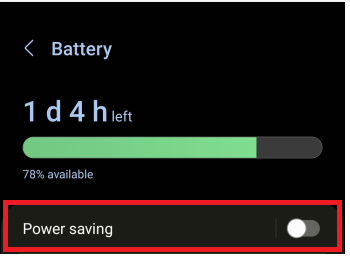
- Turn off your battery-saver/ power-saving mode:
Settings > Battery and device care > Battery > Switch power-saving mode/battery saver OFF
– Check location permissions for Skynamo:
- Settings > Apps > Skynamo > Permissions > Location > Allow all the time
- Settings > Apps > Skynamo > Permissions > Physical Activity > Allowed
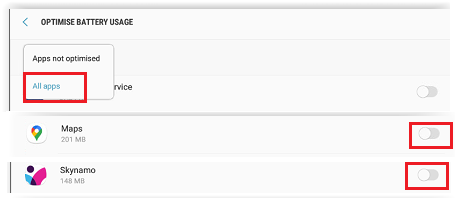
– Turn off battery optimization for Skynamo and Maps:
Settings > Apps > Skynamo > Battery > Optimize battery usage > tap on "Apps not optimized" > switch to "All apps" > Find Skynamo and Maps and turn the option OFF:
OR
Settings -> Apps -> Skynamo -> Battery -> Unrestricted
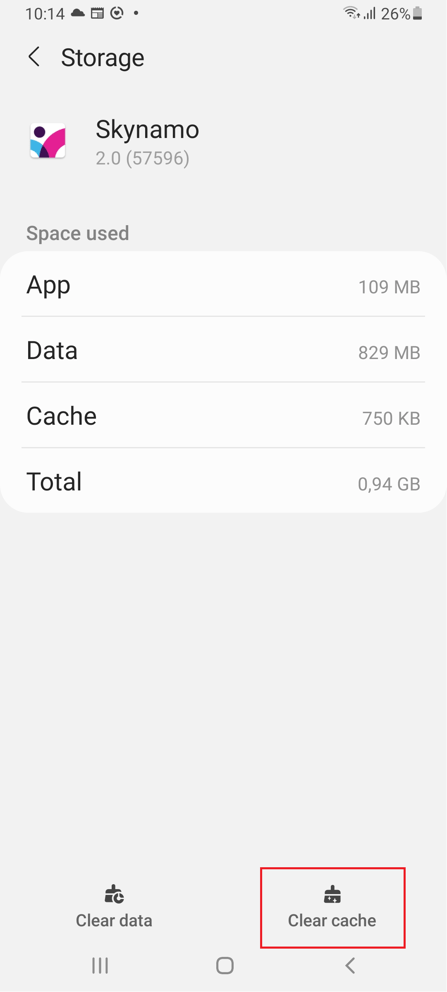
– Clear cache for Skynamo:
- Settings > Apps > Skynamo > Storage > “Clear cache”
- Turn on location permissions for maps:
Settings > Apps > Maps > Permissions > Location > Allow all the time
Settings > Apps > Maps > Permission > Physical activity > Allow
Settings > Apps > Maps > Enable

Settings > Apps > Maps > Enable
– Clear data for Maps:
- Settings > Apps > Maps > Storage > “Clear data”
- Turn off battery optimization for Maps:
Settings > Apps > Maps > Battery > Optimize battery usage > tap on "Apps not optimized" > switch to "All apps" > Find Skynamo and Maps and turn the option OFF:
OR
Settings -> Apps -> Maps -> Battery -> Unrestricted
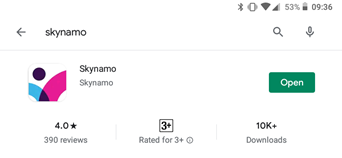
- Check that Google Maps/Maps and Skynamo are up to date:
Go to Google Play store and check if updates are available. For Play store, if it says Open/Uninstall it is up to date (i.e. no update option)
- Update your software:
Settings > Software update > Download and install > Install update. If it says "Software is up to date" then you can skip this step.